
QuillBot
AI paraphrasing, summarizing, and grammar tool for writers and students
QuillBot is an AI-powered writing and research platform best known for its advanced paraphrasing capabilities. Founded to help students, professionals, and writers improve their writing, QuillBot has evolved into a comprehensive suite of tools covering paraphrasing, summarization, grammar checking, citation generation, and research assistance.
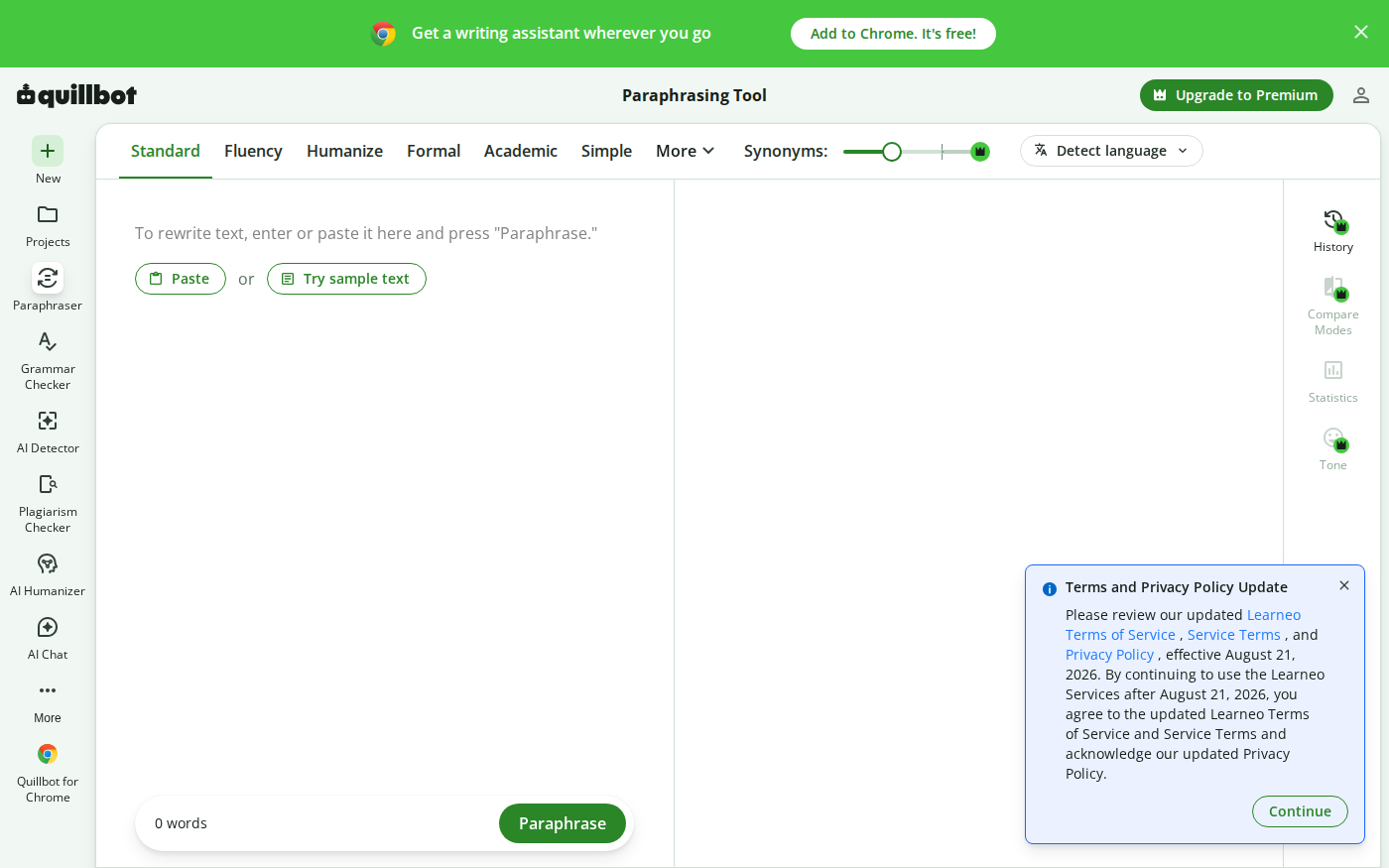
The paraphrasing tool is QuillBot's flagship feature and what made it famous. Using sophisticated natural language processing, it can rewrite text in multiple modes: Standard, Fluency, Formal, Academic, Simple, Creative, and Expand/Shorten. Each mode produces different outputs suited to different contexts — for example, Academic mode uses formal language appropriate for scholarly writing, while Creative mode might introduce more varied sentence structures and vocabulary.
QuillBot's Summarizer is particularly useful for researchers and students. It can condense long articles, research papers, or documents into concise summaries, with options to choose summary length and format. This tool saves considerable time when reviewing literature or preparing briefings.
The Grammar Checker goes beyond basic spell-checking to identify complex grammatical errors, punctuation issues, and stylistic problems. It provides explanations for corrections, helping users understand and improve their writing skills over time.
One of QuillBot's unique features is its Co-Writer mode, which integrates all its tools in a single interface. Writers can draft content while having immediate access to paraphrasing, summarizing, and grammar tools — all without switching between different applications or tabs.
The Citation Generator supports multiple formats including APA, MLA, Chicago, and others, allowing students and researchers to quickly generate properly formatted citations from URLs, DOIs, or manual input. This feature significantly reduces the tedious work of manual citation formatting.
QuillBot integrates directly with Microsoft Word and Google Docs through extensions, bringing its paraphrasing and grammar tools into the document editing workflow. This seamless integration makes it particularly popular among students and academic writers who work primarily in these environments.
For non-native English speakers, QuillBot is especially valuable. The Fluency mode specifically targets grammar and flow issues common to ESL writers, while the ability to paraphrase helps them express their ideas in more natural English without completely changing the meaning.
Key Features
- Advanced paraphrasing in 7 different modes
- AI-powered summarizer for articles and documents
- Comprehensive grammar and style checker
- Citation generator supporting APA, MLA, Chicago
- Co-Writer mode combining all tools in one interface
- Microsoft Word and Google Docs integrations
- Vocabulary enhancement suggestions
- Plagiarism detection capabilities
- Multilingual support for non-English text
- Browser extension for web-based writing
Frequently Asked Questions
Is QuillBot free to use?
Yes, QuillBot has a free plan that paraphrases up to 125 words at a time, gives two modes (Standard and Fluency), and summarizes up to 1,200 words. QuillBot Premium is $19.95 per month billed monthly, dropping to about $8.33 per month ($99.95 per year) on annual billing. Premium unlocks unlimited paraphrasing, all nine modes, full grammar checking, plagiarism detection, and the tone analyzer.
Who owns QuillBot?
QuillBot was acquired by Course Hero in August 2021, and Course Hero later rebranded as Learneo. QuillBot now operates as one of Learneo's education and productivity brands alongside CliffsNotes, LitCharts, Scribbr, Symbolab, and LanguageTool. This backing gives QuillBot continued funding and integration with a broader writing and study ecosystem.
Who is QuillBot best suited for?
QuillBot is ideal for students, academic researchers, non-native English writers, and content creators who need to paraphrase, rewrite, or improve English text. Students use it to reword content while keeping the original meaning, ESL writers rely on it to polish English, and bloggers use it to produce multiple versions of content for different platforms.
What is the biggest advantage of QuillBot?
QuillBot's strongest feature is its paraphrasing engine with multiple writing modes that preserve meaning while changing expression. The nine modes, including Fluency, Formal, Creative, Simple, and Expand, give precise control over how text is rewritten, and the Synonym Slider lets you set how aggressively the vocabulary changes for fine-grained control over the output.
Is QuillBot easy to use for beginners?
Yes, QuillBot is very easy to use. Paste your text into the editor and click Paraphrase, and the AI rewrites it instantly in the selected mode. Individual words are highlighted with clickable synonyms for manual fine-tuning. Browser extensions for Chrome and Edge plus Google Docs and Word integration let you use QuillBot wherever you write.
Alternative Tools
Other Text Generation tools you might like

Alan AI
Text GenerationAlan AI is KT's AI assistant for Korean users, offering general-purpose conversational AI with Korean language optimization, voice and text interaction, and integration with KT's telecom services.

Anyword
Text GenerationData-driven AI copywriting with predictive performance scores for marketing
Character.ai
Text GenerationCharacter.ai is an AI conversation platform where you can chat with fictional characters, historical figures, and custom AI personas created by millions of users worldwide.

ChatGPT
Text GenerationChatGPT is OpenAI's conversational AI assistant built on GPT-4, capable of writing, coding, analysis, and creative tasks across virtually any domain.

Claude AI
Text GenerationClaude is Anthropic's AI assistant built on Constitutional AI principles, emphasizing safety, honesty, and nuanced reasoning for writing, coding, analysis, and research.

CLOVA X
Text GenerationCLOVA X is Naver's AI chatbot powered by HyperCLOVA X, offering deep Korean language understanding and seamless integration with Naver's search, shopping, and map services.
Tags
Related Guides
Wordtune vs QuillBot: Which Rewriter Gives You More for Free?
Last checked: August 21, 2026 · Category: AI text-generation tools Wordtune and QuillBot can both rewrite an awkward sentence, but their free plans place the limit in different places.…

AI Editorial Calendar Workflow 2026: Jasper, Copy.ai, Notion AI, Perplexity, and Grammarly for Lean Content Teams
Last updated: August 1, 2026 · Category cluster: AI writing tools Most editorial calendars fail before a writer opens a blank document.…

PhotoRoom vs Pixlr: Which Is Better for Product Photos?
Last checked: September 4, 2026 · Category: AI image tools PhotoRoom is the more direct choice for turning product photos into consistent marketplace images; Pixlr is the more flexible choice when…

CapCut vs Descript: Which Editor Fits Talking-Head Videos?
Last checked: August 28, 2026 · Category: AI video tools CapCut and Descript can both turn a talking-head recording into a captioned video, but they make different parts of the edit feel primary.…