Otter vs Fireflies: Which Meeting Assistant Fits Your Team?
Last checked: August 14, 2026 · Category: AI productivity tools
Otter and Fireflies solve the same basic problem, but their pricing meters and strongest use cases are different. Otter puts real-time transcription, live notes, and meeting-length allowances at the center of its plans. Fireflies emphasizes broad meeting capture, integrations, storage, AI credits, and conversation intelligence. The better choice depends less on which product has the longer feature list and more on what your team needs to retain, export, automate, and govern after a call.
This comparison uses the two companies’ official pricing pages as displayed on August 14, 2026. It does not claim a measured winner for transcription accuracy: no shared audio benchmark was run for this article, and accuracy changes with microphones, accents, overlapping speakers, vocabulary, and language. Instead, the decision below is based on published plan limits and features that a buyer can verify before starting a trial.
- Choose Otter for live meeting notes and a straightforward individual workflow. Its Basic plan includes 300 monthly transcription minutes, while its paid tiers state clear per-meeting limits.
- Choose Fireflies when integrations, multilingual work, or conversation intelligence drive the purchase. Its pricing page lists 100+ transcription languages and puts conversation intelligence on Business.
- “Unlimited” does not remove every meter. Fireflies still lists storage and AI-credit allowances; Otter distinguishes recording minutes, file imports, meeting duration, and concurrent meetings.
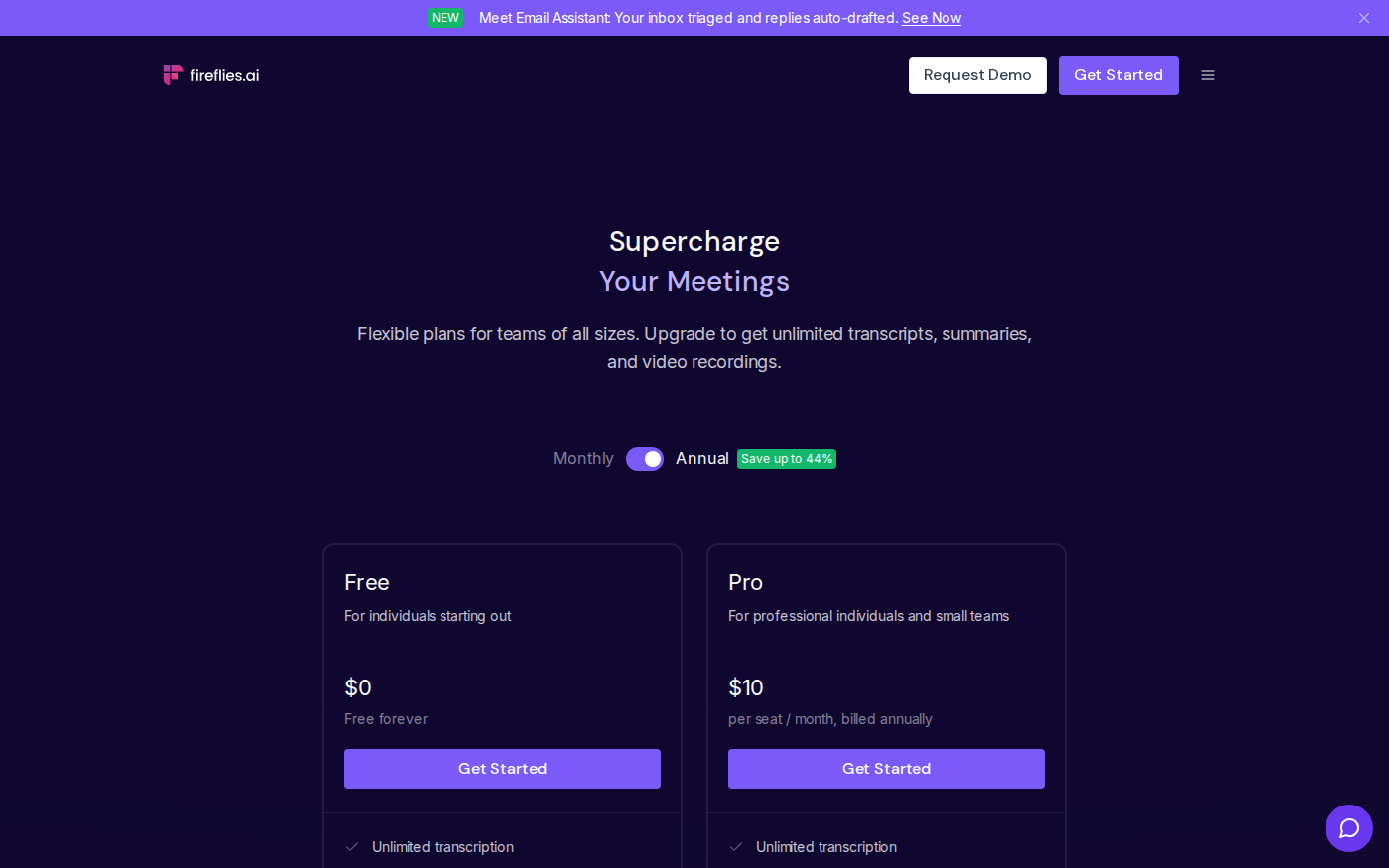
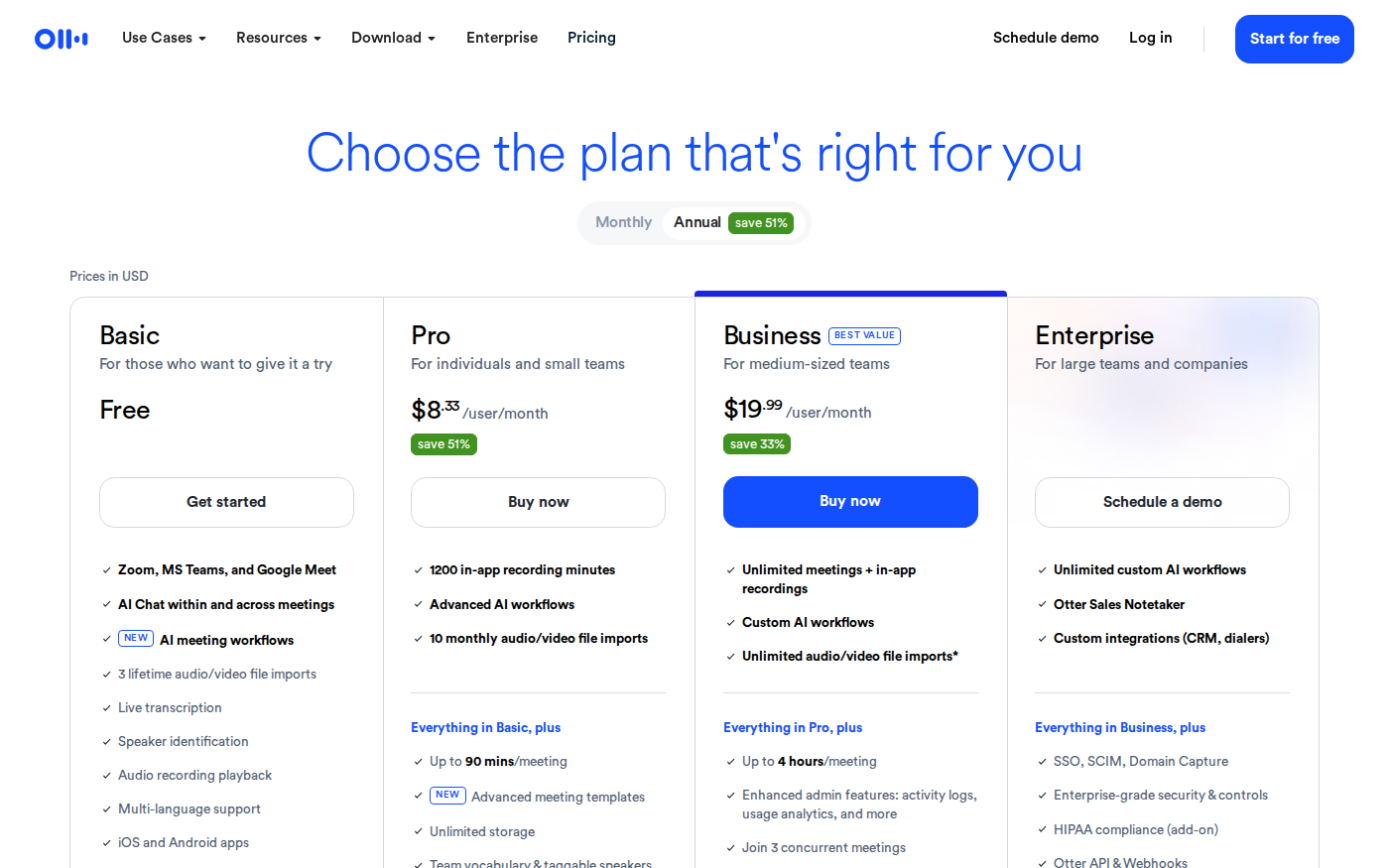
- Annual Pro pricing is close, not identical. The official pages show Otter Pro at $8.33 per user/month and Fireflies Pro at $10 per seat/month when billed annually.
- Do not buy on summary quality alone. Run the same consent-cleared calls through both products and score names, numbers, decisions, and action owners before rollout.
Otter vs Fireflies at a glance
Both products can join common video-conferencing platforms, produce searchable transcripts, summarize meetings, and help teams retrieve what was discussed. The important differences appear around those shared capabilities. Otter’s official page foregrounds live transcription, speaker identification, meeting workflows, AI Chat, mobile apps, and the duration or volume included in each tier. Fireflies foregrounds unlimited transcription and summaries, storage, AI credits, 100+ languages, downloads, integrations, analytics, and administrative controls.
| Decision point | Otter | Fireflies |
|---|---|---|
| Free plan meter | 300 transcription minutes/month; 3 lifetime file imports | Unlimited transcription and summaries; 400 minutes of storage per team; 20 AI credits |
| Annual Pro price | $8.33/user/month | $10/seat/month |
| Annual Business price | $19.99/user/month | $19/seat/month |
| Language claim on pricing page | Multi-language support | Transcription in 100+ languages; multi-language mode on Business |
| Paid-plan emphasis | Recording minutes, meeting length, workflows, search, imports | Storage, downloads, integrations, AI skills, intelligence, analytics |
| Best first shortlist | Individuals and teams centered on live notes and searchable meetings | Teams routing meeting data into CRM, task, and coaching workflows |
Prices are USD figures displayed with annual billing selected on the official pages on August 14, 2026. Taxes, promotions, user minimums, fair-use rules, add-ons, and regional billing can change the checkout total.
Free plans: minutes versus storage and credits
Otter Basic is easier to interpret if your question is simply, “How much live transcription can I use this month?” The page lists 300 monthly transcription minutes, live transcription, speaker identification, playback, AI Chat, meeting workflows, mobile apps, and three lifetime audio or video file imports. This is a practical evaluation tier for a person with a small number of short meetings. The hard trade-off is that the monthly minute allowance and lifetime import count can be reached quickly if recorded files are part of the workflow.
Fireflies Free uses a different set of meters. Its page lists unlimited transcription and unlimited AI summaries, but also 400 minutes of storage per team and 20 AI credits. That means “unlimited transcription” should not be read as “every related resource is unlimited.” A team evaluating Fireflies should watch what happens when storage fills, which AI actions consume credits, whether old recordings need to be removed, and what the export options are on Free.
The free plans therefore answer different trial questions. Otter Basic helps verify whether live transcripts, speaker labels, and AI Chat fit an individual meeting routine within 300 minutes. Fireflies Free helps verify capture across supported meeting services, language handling, search, and AskFred while monitoring storage and credits. Before inviting either bot to recurring meetings, set a trial end date and a deletion plan so a test does not quietly become an unmanaged archive.
Paid pricing: compare the whole meter, not one number
With annual billing selected, Otter Pro is listed at $8.33 per user/month. The page includes 1,200 in-app recording minutes, ten monthly audio or video file imports, meetings up to 90 minutes, unlimited storage, advanced search and export, team vocabulary, advanced meeting templates, and selected Salesforce, HubSpot, and Zapier integrations. Otter notes that Salesforce and HubSpot integrations are subject to user limits.
Fireflies Pro is listed at $10 per seat/month billed annually; the page also shows $18 for monthly billing. It includes unlimited transcription and summaries, 8,000 minutes of storage per seat, 20 AI credits, video recording, downloads, action items and task manager, AI Skills, Voice Agents, a personal assistant, and unlimited integrations. If exported recordings and downstream automations matter, those inclusions may outweigh the small annual price difference. If most users only need live searchable notes, Otter’s lower annual Pro display may be enough.
At Business, the annual prices shown are nearly level: $19.99 per user/month for Otter and $19 per seat/month for Fireflies. The packages are not equivalent. Otter lists unlimited meetings and in-app recordings, meetings up to four hours, three concurrent meetings, custom workflows, enhanced administration, and prioritized support. Fireflies lists unlimited storage, 30 AI credits, multi-language mode, conversation intelligence, team analytics, public meeting access, and user groups. Price should be the final tie-breaker only after these operational differences are mapped to real roles.
Live notes or a meeting-data pipeline?
Otter is the clearer starting point when the central job is to follow a conversation as it happens. Live transcription, speaker identification, audio playback, AI Chat, and meeting workflows are included on Basic according to the official page. Pro adds vocabulary, taggable speakers, search, export, and advanced templates. This product shape suits an interview, lecture, project meeting, or client call where a participant wants to see and revisit the record directly.
Fireflies is the clearer starting point when the transcript is an input to another system. Its Pro plan explicitly advertises downloads, action items, unlimited integrations, AI Skills, and Voice Agents. Business adds conversation intelligence and team analytics. Those features are relevant when sales operations wants notes in a CRM, customer success wants recurring themes, or managers need call-level patterns rather than only a readable transcript.
This is not a claim that one product cannot perform the other job. Otter lists CRM and Zapier integrations on Pro and custom integrations at Enterprise. Fireflies includes real-time notes and live transcription on Free. The distinction is a buying lens: inspect the parts each vendor meters and promotes, then confirm that the exact connector, field mapping, and admin behavior your team needs are included in the selected plan.
Languages, accuracy, and the test you should actually run
Fireflies makes the broader numerical language claim on its pricing page: transcription in 100+ languages. Its Business plan separately lists multi-language mode. Otter’s page lists multi-language support without putting a language count in the plan card. A language count does not establish accuracy for your calls, especially when a meeting switches languages, uses product names, includes remote participants, or has several people speaking at once.
Use a consent-cleared evaluation set rather than a polished demo. Include one quiet one-to-one call, one normal team meeting, and one difficult recording with the audio conditions your organization actually encounters. For each output, count errors in five fields: participant names, numbers and dates, product or technical terms, decisions, and action items with owners. Also note how long a reviewer spends correcting the transcript and summary. These are your measured numbers; do not substitute a vendor’s generic accuracy claim for them.
Teams comparing more options can browse the findaiverse productivity category. The dedicated Otter.ai profile and Fireflies.ai profile provide compact feature references, but the vendor’s checkout and policy pages remain the source of truth for a purchase.
Privacy and rollout checks before either meeting bot joins
A meeting assistant can create a durable record of conversations that participants once treated as temporary. Before enabling auto-join, decide who can authorize recording, how attendees are notified, which meeting types are excluded, who can open transcripts and recordings, and when data is deleted. Sensitive HR discussions, legal advice, health information, unreleased financial results, security incidents, and customer credentials should not enter a general meeting archive by default.
Plan pages are useful for feature comparison but are not a substitute for reviewing current security, privacy, data-processing, retention, and compliance terms. Otter’s Enterprise section lists SSO, SCIM, domain capture, enterprise controls, and HIPAA compliance as an add-on. Fireflies Enterprise lists SSO and SCIM, audit logs, HIPAA compliance, private storage, custom retention, and transcript-and-summary-only mode. Confirm scope and contractual availability directly with the vendor; a feature label on a pricing page does not by itself establish that your organization’s compliance requirements are met.
A controlled rollout is safer than connecting every calendar. Start with a small group, allow only selected meeting categories, define transcript owners, and review sharing defaults. Test what happens when an employee leaves, a guest requests deletion, a meeting is marked private, or an integration token is revoked. The winning product is the one your team can operate responsibly after the novelty of automatic notes wears off.
Which one should you choose?
- Choose Otter if your priority is live transcription, searchable individual notes, clear monthly recording allowances, or long Business-tier meetings with concurrent capture.
- Choose Fireflies if your priority is 100+ listed transcription languages, broad integrations, downloadable meeting assets, conversation intelligence, or team analytics.
- Stay on a free plan if you are still validating transcript correction time and summary usefulness. Watch Otter’s minute and import limits; watch Fireflies’ storage and AI credits.
- Do not choose yet if recording consent, retention, access, and deletion are unresolved. Governance is a prerequisite, not an Enterprise-plan cleanup task.
For most buyers, the practical answer is a two-week comparison using the same approved meeting types. Score output quality, review time, integration reliability, participant experience, and the projected cost at your actual seat count. Otter’s annual Pro price is lower on the checked pages, while Fireflies exposes a broader automation and analytics path. Either advantage can disappear if the surrounding workflow is the wrong fit.
Frequently asked questions
Is Otter cheaper than Fireflies?
At the annual Pro prices displayed on August 14, 2026, yes: Otter shows $8.33 per user/month and Fireflies shows $10 per seat/month. At Business, Fireflies shows $19 and Otter $19.99. The included meters differ, so compare storage, minutes, imports, credits, integrations, and required seats before calculating the real total.
Which has the better free plan?
It depends on the constraint you prefer. Otter Basic lists 300 transcription minutes per month and three lifetime file imports. Fireflies Free lists unlimited transcription and summaries but limits team storage to 400 minutes and includes 20 AI credits. A short trial should reveal which limit reaches your workflow first.
Which is better for multilingual meetings?
Fireflies makes the more explicit pricing-page claim, listing transcription in 100+ languages and multi-language mode on Business. That does not guarantee better results for your language mix. Evaluate both with consent-cleared recordings that include the accents, terminology, and language switching your team actually uses.
Can either tool replace a human meeting owner?
No. A generated summary can omit context or assign an action incorrectly. A named person should still confirm decisions, owners, deadlines, and what may be shared. For legal, personnel, financial, medical, or security-sensitive meetings, apply a stricter policy or exclude automatic recording entirely.