PhotoRoom vs Pixlr: Which Is Better for Product Photos?
Last checked: September 4, 2026 · Category: AI image tools
PhotoRoom is the more direct choice for turning product photos into consistent marketplace images; Pixlr is the more flexible choice when background removal is only one step in a broader edit. PhotoRoom organizes its product around cutouts, listing-ready backgrounds, catalog exports, batch work, and an API. Pixlr opens as a general browser editor, with quick and advanced workspaces plus tools for layers, effects, generative edits, collages, and design.
This comparison uses the official product interfaces and pricing pages displayed on September 4, 2026. It does not name a winner for edge accuracy, generation quality, or processing speed because the same image set was not scored in both products. Instead, it compares the documented workflows, controls, free entry points, paid limits, and catalog features that affect a purchasing decision.
- Choose PhotoRoom for a repeatable listing pipeline. Its public workflow starts with a product photo, removes the background, then moves toward white, transparent, studio, or lifestyle outputs.
- Choose Pixlr for editing control. Pixlr Express offers a quick browser editor, while Pixlr Editor is the more advanced workspace; the wider suite includes generative fill, object removal, retouching, collage, text, and other creative tools.
- Both offer a free way to begin, but neither checked public page states one simple numeric free allowance. Confirm the export size, watermark, save limit, and AI-credit balance in your account before processing a catalog.
- The paid meters are different. PhotoRoom combines monthly AI credits with monthly exports; Pixlr’s paid plans emphasize monthly AI credits and unlimited saves.
- AI-generated scenes still need a product-truth review. Check labels, color, proportions, reflective details, included accessories, and marketplace image rules before publishing.
The short answer: optimize the repeatable step
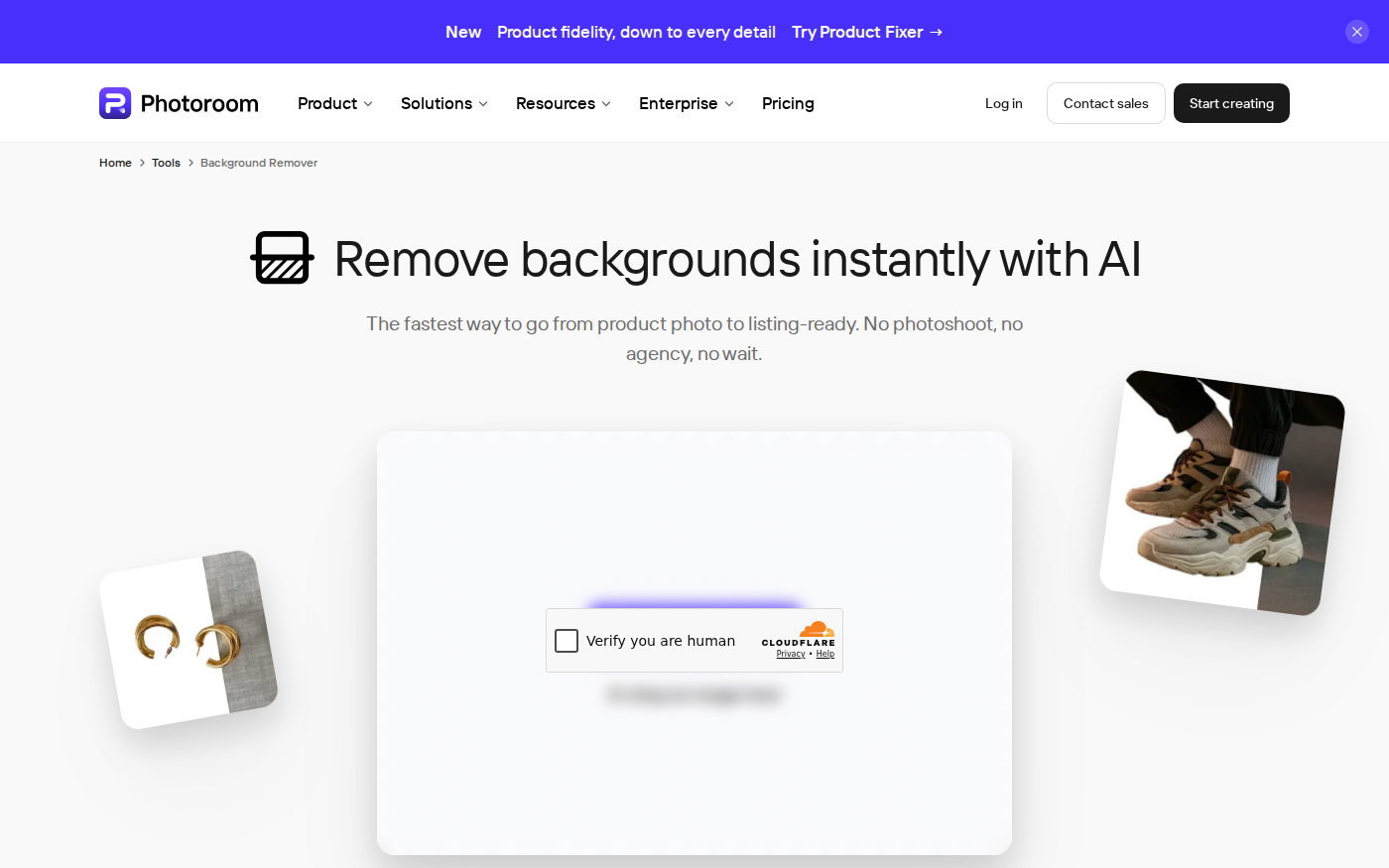
If your recurring job is “photograph an item, isolate it, place it on a compliant background, resize it, and publish it,” start with PhotoRoom. The official Background Remover page describes that exact path and connects it to product staging, AI backgrounds, shadows, resizing, Batch, Shopify, and API workflows. It is not merely a one-click cutout page; the product is structured around producing and maintaining commerce visuals.
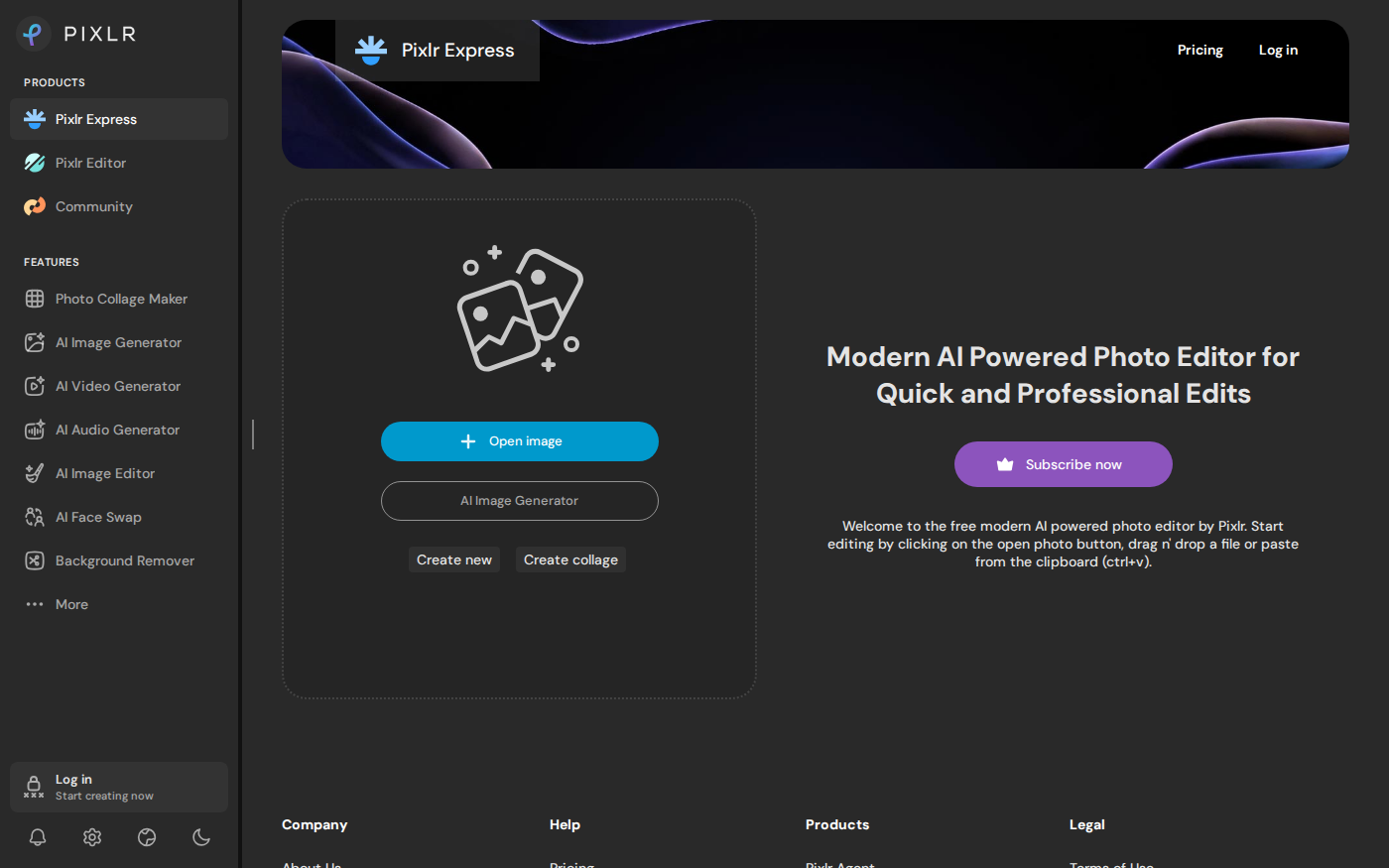
If the recurring job begins with “open an image and decide what needs changing,” start with Pixlr. Pixlr Express accepts an uploaded image, drag-and-drop, or clipboard paste, and its suite exposes quick fixes alongside generative fill, object removal, retouching, collage, and content-generation tools. Pixlr Editor provides the more advanced editing route when a quick preset is not enough.
The distinction is about the center of the workflow, not an absolute capability boundary. PhotoRoom includes editing and creative-generation features. Pixlr includes a dedicated background remover and AI tools. The practical question is what happens after the automatic cutout: repeat a product template across a catalog, or continue making image-specific decisions.
Product pipeline versus general photo editor
PhotoRoom’s public entry screen asks for a photo and frames the result as “listing-ready.” Its documented sequence is upload, automatic background removal, background selection, then download as PNG, JPEG, or WebP—or save to an account for later editing. Adjacent official tools cover white and transparent backgrounds, product staging, AI backgrounds, shadows, object removal, product beautification, resizing, and brand assets.
Pixlr Express presents a broader editing start: Open image, AI Image Generator, Create new, or Create collage. Its navigation also links to Pixlr Editor, generative fill, generative expand, object removal, noise removal, skin enhancement, backdrop generation, face swap, conversion, and other tools. That range is useful when a product image must become an ad, banner, collage, or social post rather than one standardized marketplace asset.
Background removal and product staging
For a simple transparent or white-background image, both products provide a direct route. PhotoRoom says its remover accepts JPEG or PNG and downloads PNG, JPEG, or WebP. Pixlr lists Background Remover as a standalone feature and also exposes AI Cutout controls inside its editing environment. Either route still requires visual inspection around hair, fur, translucent packaging, spokes, handles, reflections, and shadows.
PhotoRoom makes the next commerce step more explicit. Its official page links the cutout to AI Backgrounds, Product Staging, AI Shadows, Virtual Model, Product Beautifier, and channel-specific resizing. That is valuable when one source photo must become a clean main image, a lifestyle scene, and several aspect ratios while preserving a recognizable product.
Pixlr’s advantage appears when the new background is part of a larger composition. An editor-oriented workflow is better suited to placing and adjusting multiple elements, adding text, creating a collage, applying effects, or revising only a selected area. For a separate tool focused almost entirely on cutouts, compare the remove.bg profile as well.
Do not treat a generated lifestyle scene as evidence that the item has a feature, scale, finish, or accessory it does not have. A visually convincing shadow can imply a different shape; generated text can alter a label; a staged room can distort size. Keep the original product photo available and compare the final export at full resolution before it enters a listing.
Free access, prices, credits, and exports
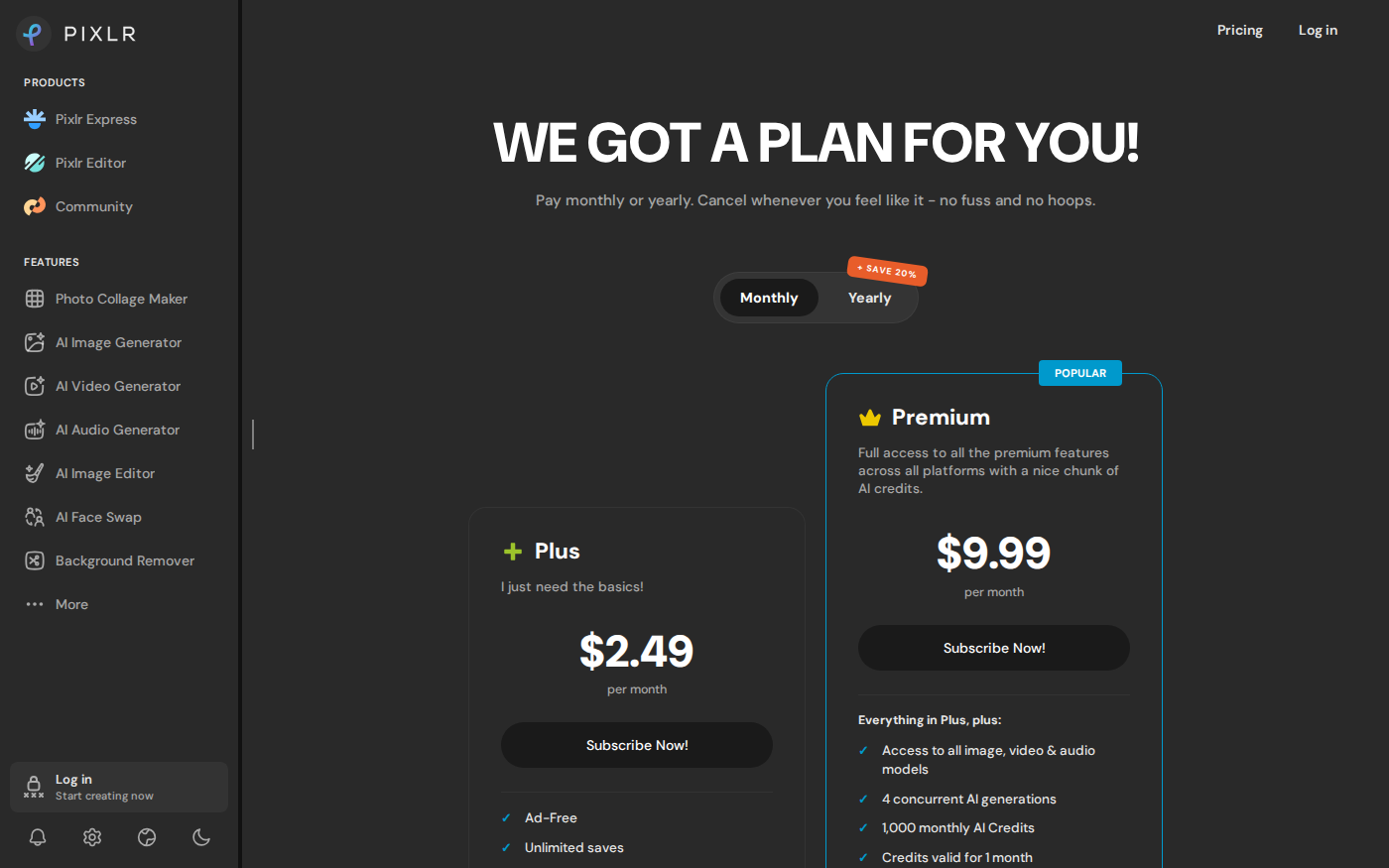
The table reflects the official pages displayed on September 4, 2026. PhotoRoom localized its page to South Korean won and explicitly labeled the region. Pixlr displayed US dollars. Taxes, app-store billing, promotions, country, and renewal terms can change the checkout amount, so these figures are a dated reference rather than a universal quote.
| Plan | Price shown | Published monthly allowance | Important limit |
|---|---|---|---|
| PhotoRoom free start | Free entry for background removal | No single numeric free export or AI-credit allowance shown on the checked public pages | High-resolution exports and more AI tools may require an upgrade |
| PhotoRoom Pro | ₩12,900 monthly; ₩7,417/month billed yearly | 8,000 AI credits; 1,000 exports | Each saved image from editor, Batch, or Shopify sync counts as one export |
| PhotoRoom Max | ₩33,900 monthly; ₩16,584/month billed yearly | 25,000 AI credits; 3,000 exports | Credits are shared across the Space; exports pause at the plan limit |
| Pixlr free editor | Pixlr Express is described as free | No numeric free save or AI-credit quota stated on the checked pages | Check account-level export and AI restrictions before production work |
| Pixlr Plus | $2.49/month | 80 AI credits; unlimited saves | Credits are valid for one month; one concurrent AI generation |
| Pixlr Premium | $9.99/month | 1,000 AI credits; unlimited saves | Four concurrent AI generations; credits expire after one month |
| Pixlr Ultra | From $24.99/month; Max $49.99/month | Up to 10,000 AI credits; unlimited “fast” image generations under fair use | Availability can vary with demand and system capacity |
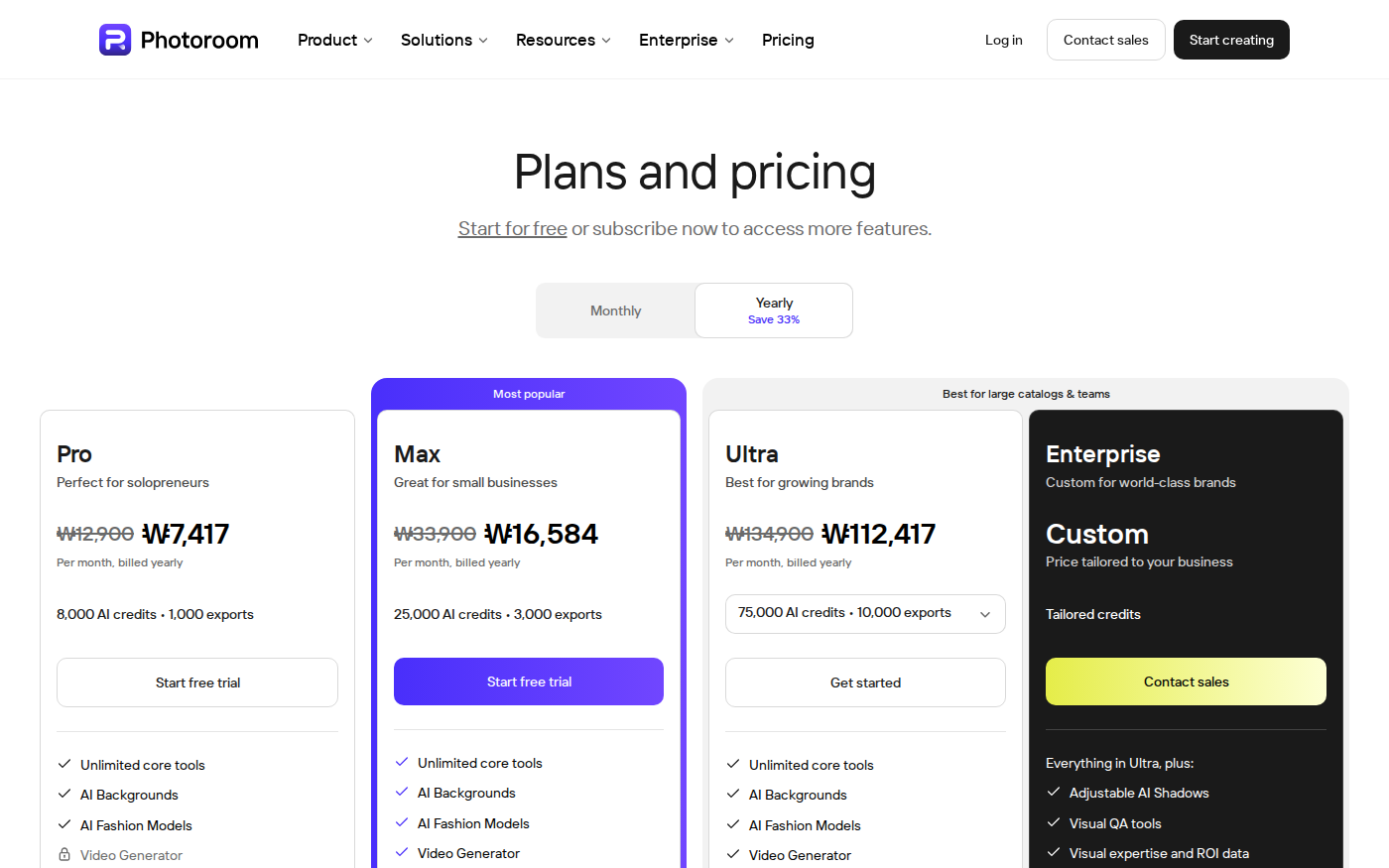
PhotoRoom distinguishes core tools from credit-consuming AI tools. Its pricing FAQ says Background Remover, preset Shadows, Product Fixer, Retouch, AI Fill, AI Expand/Resize, and Image Enhancer are included on paid plans under fair-use limits. More resource-intensive tools draw from the AI pool. Its export counter is separate: every image saved through the editor, Batch, or Shopify sync counts, while API and MCP usage use another allowance.
Pixlr’s paid comparison makes saves and AI generation separate concerns. Plus and above list unlimited saves, while AI actions draw from monthly credits. The page also provides estimates because a “fast,” “pro,” video, or other model does not necessarily consume the same number of credits. Base the plan on the costly action you repeat, not simply the number of source photos.
Batch work and catalog scale
PhotoRoom is the clearer fit when consistency must survive volume. Its official material explicitly connects Batch to background removal, resizing, padding, backgrounds, and catalog preparation. The API route is relevant when images need to flow directly from a marketplace, product-information system, or internal upload process. Teams should calculate both meters: an automated generation can consume credits, and the finished saved image can consume an export.
Pixlr’s paid plans can remove save anxiety, but “unlimited saves” does not by itself define a catalog automation workflow. Pixlr remains attractive when each asset receives different creative treatment or when one product cutout becomes several hand-composed campaign variants. Before choosing either product for hundreds of SKUs, run a controlled sample that includes difficult edges, transparent parts, reflective packaging, white products, and several target aspect ratios.
Which tool fits each job?
A single marketplace main image
Start with PhotoRoom when the destination requires a clean white or transparent background and the rest of the edit is standardized. Start with Pixlr when the cutout needs manual composition, selected-area repair, or continued creative editing. For either tool, inspect the edge at full size and compare the product color with the source.
A recurring seller catalog
PhotoRoom’s Batch, brand, Shopify, and API positioning is better aligned with repeatable catalog production. Check how many final variants each source photo creates: one item exported to four marketplace sizes can use four exports, not one, under PhotoRoom’s published definition.
Ads, banners, collages, and social variants
Pixlr is the more natural starting point when the output combines product cutouts with typography, multiple images, effects, generated areas, or collage layouts. Its Express and Editor routes let the project stay inside a general editing environment after background removal.
A mixed workflow
Using both can make sense when PhotoRoom owns the standardized product cutout and Pixlr owns the campaign composition. Preserve a transparent master at the required resolution, use stable file names, and decide which app is allowed to change the product itself. Otherwise, repeated JPEG handoffs and duplicated resizing can degrade the asset and make corrections harder to trace.
A safer product-image checklist
- Keep the untouched source image and a transparent master.
- Inspect thin edges, openings, reflections, transparent packaging, labels, and shadows at 100% zoom.
- Compare color and proportions with the physical product or approved source photography.
- Verify each marketplace’s current main-image, background, crop, resolution, and text-overlay rules.
- Record whether an AI background, virtual model, or product alteration was used.
- Export one complete sample set before committing to annual billing or a large batch.
- Check the checkout currency, billing period, tax, renewal amount, app-store terms, and monthly reset date.
Frequently asked questions
Is PhotoRoom or Pixlr better for product photos?
PhotoRoom is better aligned with standardized listing images, repeated background work, batches, and catalog automation. Pixlr is better aligned with broader editing, compositing, selected-area changes, graphics, and creative variants. Image-quality superiority cannot be established without testing the same files and scoring the outputs.
Can I use PhotoRoom and Pixlr for free?
PhotoRoom’s official page offers a free start for background removal, and Pixlr Express describes itself as a free browser editor. The checked public pages did not state one numeric free export, save, or AI-credit allowance, so verify the account-level restriction and final export before starting a large job.
Which one is cheaper?
Pixlr’s entry paid tier was $2.49 per month, while PhotoRoom’s South Korea pricing page showed Pro at ₩12,900 monthly or ₩7,417 per month billed yearly. They do not meter the same thing: Pixlr Plus lists unlimited saves and 80 AI credits, while PhotoRoom Pro lists 8,000 AI credits and 1,000 exports. Compare the limit your workflow will actually reach.
Does PhotoRoom support batch editing?
Yes. PhotoRoom’s official product pages describe Batch for applying background removal, resizing, padding, backgrounds, and related changes across many images. Its pricing FAQ says each image saved from Batch counts toward the monthly export allowance.
Does Pixlr have an advanced editor?
Yes. Pixlr separates the quick Pixlr Express experience from Pixlr Editor, its more advanced editing workspace. Its broader navigation also includes generative fill, object removal, retouching, background removal, collage, and media-generation tools.
Can AI backgrounds be used in marketplace listings?
That depends on the marketplace, placement, and product category. Main-image rules may require a plain background and restrict added text, props, or misleading elements. Even when a lifestyle image is allowed, verify that the generated scene does not alter the product, imply an included accessory, or misrepresent scale.
Compare the tools before processing a catalog
Review the PhotoRoom profile, the Pixlr profile, or browse the AI image tools category.