Free AI Image Generators 2026: What Each Free Plan Actually Gives You
Last updated: 2026-10-28 · Category cluster: Image Generation
Almost every AI image tool calls itself free. Very few of them mean the same thing by it. One gives you a picture without an account but keeps it public and stamps a watermark on it. One gives you a commercial licence but only three generations a month on its good models. One keeps working after your credits run out. One is free to run on your own GPU but stops being free the moment your company passes a revenue line.
This page is the result of opening each vendor's own pricing page on 27–28 October 2026 and writing down what it said. Where a vendor does not publish a number, we say so instead of estimating one — a missing number is information too, and it is usually the number that decides whether a free plan is usable for you.
The short version
If you only read one thing: the free plan that fits you depends on which constraint you can live with — publicity, volume, licence, or setup effort.
| Tool | What the free plan gives | The constraint |
|---|---|---|
| Craiyon | Generation with no account at all | Watermarked, public by default, no HD download, attribution required |
| Playground AI | Worldwide royalty-free commercial licence | 3 generations a month on the premium models; 2 downloads a day |
| NightCafe Creator | First creation each day is free | Extra credits come from streaks and challenges, not a fixed allowance |
| Artbreeder | Splicer and slow Collager keep working after credits run out | The free credit limit is not published |
| Krea AI | 100 units a day | Upscaling capped at 2K, one image at a time, LoRA training capped at 50 images |
| Adobe Firefly | Limited daily generations across image, video and audio | No monthly credit grant; the daily number is not published |
| Stable Diffusion | Weights free to self-host, commercial use included | Only under US$1,000,000 annual revenue, and you must register |
| Remove.bg | Unlimited low-resolution cut-outs on the website | Capped at 0.25 megapixels, personal use |
Free without an account: Craiyon
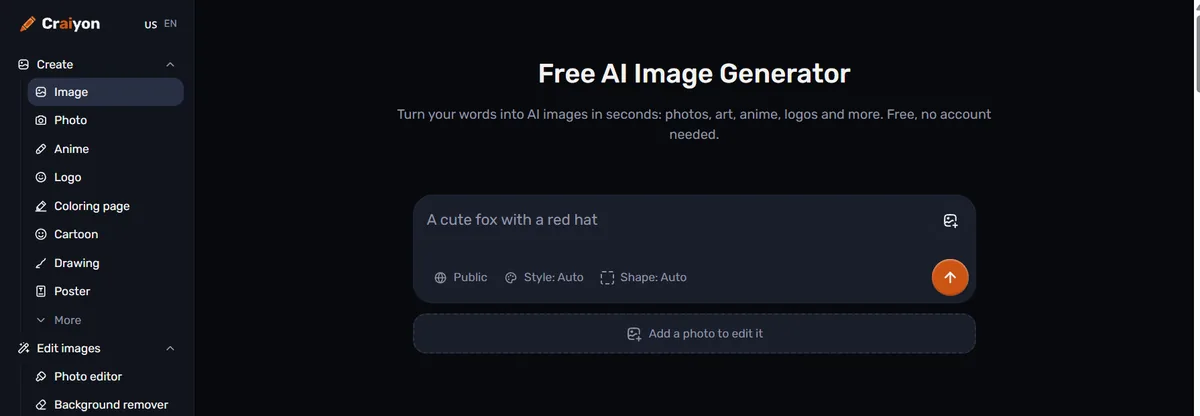
Craiyon is the only tool here that will generate an image for someone who has not signed up for anything. Its home page says so directly — “Free, no account needed” — and the prompt box works immediately.
The trade is visibility. The visibility control next to the prompt box defaults to Public, so what you make goes into the public gallery unless you change it. Free output carries a watermark, downloads are not high-resolution, and the free licence asks for attribution. Private generation, HD downloads and watermark removal are the paid tier.
That makes Craiyon excellent for the first ten minutes of an idea and wrong for anything confidential. Do not put an unannounced product, a client's brief or anything under embargo into a tool whose default is public. For a quick sketch where none of that matters, nothing else gets you to an image faster. Background removal and upscaling sit on the same page, so a rough idea can be cleaned up without moving tools. See our Craiyon breakdown for the full free-versus-paid split.
Free with a commercial licence: Playground AI
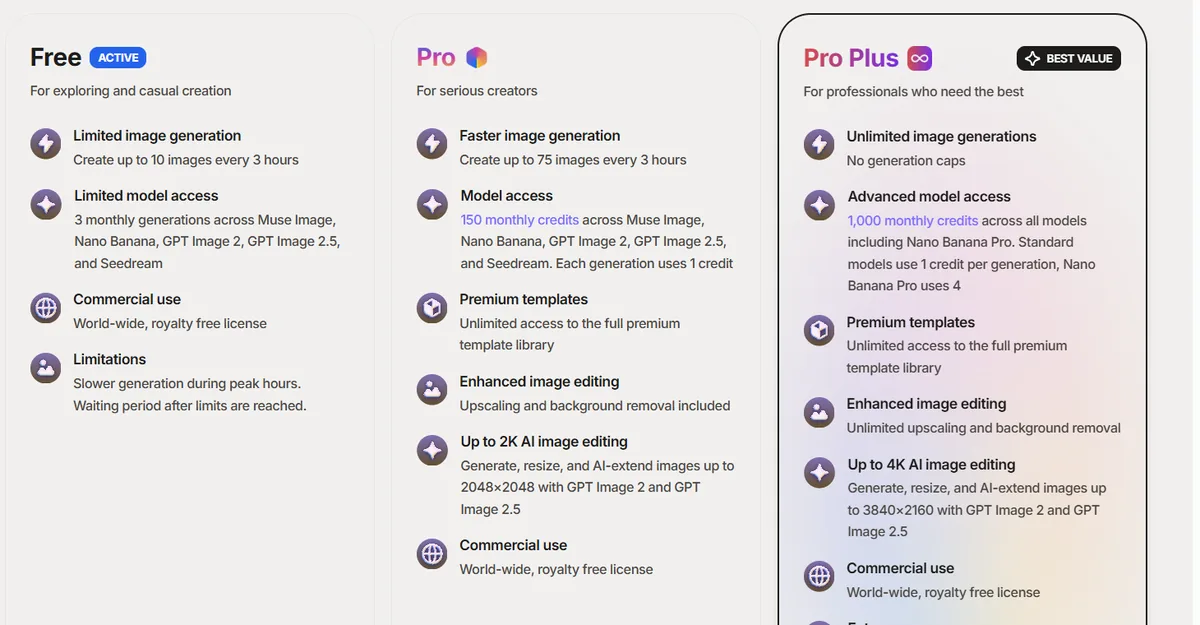
Most free image plans either forbid commercial use or stay quiet about it. Playground AI puts “Commercial use — world-wide, royalty free license” directly on the free plan card. For a one-person business that needs a handful of legitimate images, that single line can matter more than any quality comparison.
The volume is small and worth stating precisely. The free card advertises up to 10 images every 3 hours, while the comparison table lower on the same page lists 5 images per 3-hour window for the free tier — the vendor publishes both numbers, so plan for the lower one. The newer models (Muse Image, Nano Banana, GPT Image 2 and 2.5, Seedream) are limited to 3 generations a month, and downloads are capped at 2 a day. Paid plans are Pro at $15 a month, or $12 a month billed annually ($144 a year), and Pro Plus at $45 a month, or $36 billed annually ($432 a year).
So: good for a few images you actually intend to publish, bad for volume. The Playground AI page has the credit table.
Free once a day: NightCafe
NightCafe lists “First creation each day is free” as a standing feature. There is no fixed daily credit allowance beyond that; additional credits accumulate from login streaks, the Daily Challenge and badges. That structure rewards habit and punishes bursts — if you want twenty images this afternoon, this is the wrong free plan, and if you want one image a day for a month, it is one of the better ones.
Paid is four tiers, excluding tax: AI Hobbyist $12.50 a month (200 fast credits), AI Enthusiast $25 (500), AI Creator $40 (850) and AI Artist $62.50 (1,400). Annual billing takes roughly 40% off and the vendor publishes those amounts — $7.49, $14.99, $23.99 and $37.49 a month, billed $89.91, $179.91, $287.93 and $449.91 a year. Details are on the NightCafe page.
Free after the credits run out: Artbreeder
Running out of credits usually means the tool stops. Artbreeder's own FAQ says otherwise: if you run out, “you'll still be able to use free features like creating Splicer images, or generating slow Collager images.” The work slows down rather than halting.
Artbreeder also works differently from the rest of this list. Instead of writing a prompt and getting one picture, you blend and mutate existing images, which suits exploring variations of a face or a character more than producing a finished campaign asset. Paid plans are credit bundles: Starter $8.99 a month (100 credits), Advanced $18.99 (275) and Champion $38.99 (700); billed yearly those work out at $7.49, $15.99 and $30.99 a month. The vendor does not publish the free credit limit. More on the Artbreeder page.
The largest daily allowances: Krea and Adobe Firefly
Krea AI publishes the most generous free number we found: $0 a month with 100 units a day. The free tier also caps upscaling at 2K, allows one image at a time, and limits LoRA training to 50 images. Paid starts at $9 a month billed monthly, or $5 a month billed yearly.
Adobe Firefly has a free plan with limited daily generations across image, video and audio, and — unlike its paid tiers — no monthly credit grant. Adobe does not publish the daily figure. Paid is Standard $9.99 a month (2,000 generative credits), Pro $19.99 (4,000) and Pro Plus $49.99 (10,000). Firefly is also the tool most often chosen for commercial safety reasons rather than output quality, which is a different question from what the free tier gives you.
Free to run yourself: Stable Diffusion
Stable Diffusion is free in a sense none of the others are: the model weights are yours to download and run. The licence is the catch. Under the Stability AI Community License, research, non-commercial use, and commercial use by organisations under US$1,000,000 in annual revenue are covered, and commercial users must register. Above that revenue line you need a paid licence.
The other cost is not money. Self-hosting means a GPU, an install, and your own time maintaining it. For a team that already runs its own infrastructure and cares about keeping images off third-party servers, that trade is usually worth it. For someone who wants a picture this afternoon, it is not.
Free for background removal and editing
Generating an image is often not the task. Cutting a product out of a photograph is.
Remove.bg gives unlimited low-resolution output on its website for personal use, capped at 0.25 megapixels, plus 50 free previews a month for the desktop app and API. That cap is the whole story: a 0.25 MP cut-out is fine for a thumbnail and too small for a product listing. Its paid pricing is region-based, so the currency you see depends on where you are.
PhotoRoom offers free online background removal but does not publish a numeric free quota; paid is $12.99 a month or $89.99 a year. Pixlr gives a free browser editor, again without a published free save or AI quota; Plus is $2.49 a month ($1.99 billed annually) and Premium $9.99 ($7.99 annually). Both were last verified on 15 August 2026, so treat those figures as older than the rest of this page.
Tools with no free plan at all
Four well-known names belong on this list only to save you the search:
- Midjourney — no free tier. Basic is $10 a month (3.3 GPU hours), rising to Mega at $120. Annual billing is 20% off.
- Magnific AI — no free tier. Premium $20 a month, or $14.50 billed annually.
- Simplified — no free plan; every tier starts with a 7-day trial. Pro is US$19 a month billed annually, US$29 month to month.
- Flux — no subscription at all. Its pricing page says “No subscriptions, no seat fees. Only pay for what you generate,” at $0.048 per image on FLUX 3 Image. Cheap per picture, but not free.
DALL-E no longer exists as a product you buy. The DALL·E API models were retired on 12 May 2026; image generation now comes bundled with a ChatGPT plan, including the free tier with limits, or through the gpt-image models billed per token.
Where the numbers are missing
Three gaps are worth naming, because a comparison that hides them is less useful than one that admits them.
First, several vendors advertise a free plan without publishing its size: Adobe Firefly, PhotoRoom, Pixlr and Artbreeder all do this. “Limited daily generations” cannot be compared with “100 units a day.” If the number matters to your decision, you will have to sign up and watch the counter.
Second, free plans move. Ideogram is the clearest example we hit while writing this: on 27 October 2026 its pricing page listed a free tier of 30 credits a week for accounts signed in with Google, Apple or Microsoft. On 28 October, none of the three pricing tabs showed a free plan — only Plus at $20 a month ($180 billed annually), Pro at $60 ($504) and Team at $30 per user ($240), plus pay-as-you-go credits at 1¢ each. We have marked free access there as unconfirmed rather than guess which day was the exception.
Third, some pricing pages refuse automated readers, which is why Leonardo AI carries no verification date from us. We would rather leave a blank than publish a number we could not read on the vendor's own page.
FAQ
Which free AI image generator needs no sign-up?
Craiyon. Its home page states “Free, no account needed,” and the prompt box works without logging in. Output is watermarked and public by default.
Can I use free AI images commercially?
It depends entirely on the tool, and it is the thing to check first. Playground AI states a worldwide royalty-free commercial licence on its free plan. Stable Diffusion's Community License permits commercial use below US$1,000,000 in annual revenue with registration. Craiyon's free output requires attribution. Several others do not address it on the pricing page at all.
Which free plan gives the most images?
Of the published figures, Krea AI's 100 units a day is the largest. Remove.bg's unlimited low-resolution output is larger still but only applies to background removal, at up to 0.25 megapixels.
Why do some entries say the free limit is not published?
Because the vendor does not state it. We read figures from each company's own pricing page and leave the field empty when there is nothing to read, rather than repeating a number from a third-party blog.
How current are these figures?
Every figure on this page was read from the vendor's own pricing page on 27 or 28 October 2026, except PhotoRoom and Pixlr, which were last checked on 15 August 2026. Pricing pages change without notice — the Ideogram case above happened within a single day.
Before you pick one
Decide the constraint before the tool. If the images cannot be public, Craiyon is out regardless of how fast it is. If you need a licence you can point a client at, Playground AI's free plan says more in one line than most paid plans do. If you want volume, free plans are the wrong place to look and the honest answer is a $9–$15 tier. And if the number you need is not on this page, it is probably not on the vendor's page either — which is itself a reason to be careful.
The full list, with the verification date on each entry, is in our Image Generation category.